> ## Documentation Index
> Fetch the complete documentation index at: https://sourcebot-jminnetian-askskills.mintlify.site/llms.txt
> Use this file to discover all available pages before exploring further.
# SCIM
export const feature_0 = "SCIM provisioning"
export const verb_0 = undefined
SCIM, or *System for Cross-domain Identity Management* allows for the automation of user provisioning for your Sourcebot organization.
 {feature_0} {verb_0 ?? "is"} only available in a paid plan. Please activate a [license key](/docs/activating-a-subscription) to use this feature.
## Overview
SCIM provisioning lets your identity provider manage Sourcebot organization membership automatically. When enabled, your identity provider becomes the source of truth for who should have access to your Sourcebot organization.
Sourcebot supports SCIM 2.0 user provisioning for identity providers such as Okta and Microsoft Entra ID.
## Configure
1. Navigate to **Settings -> Security**.
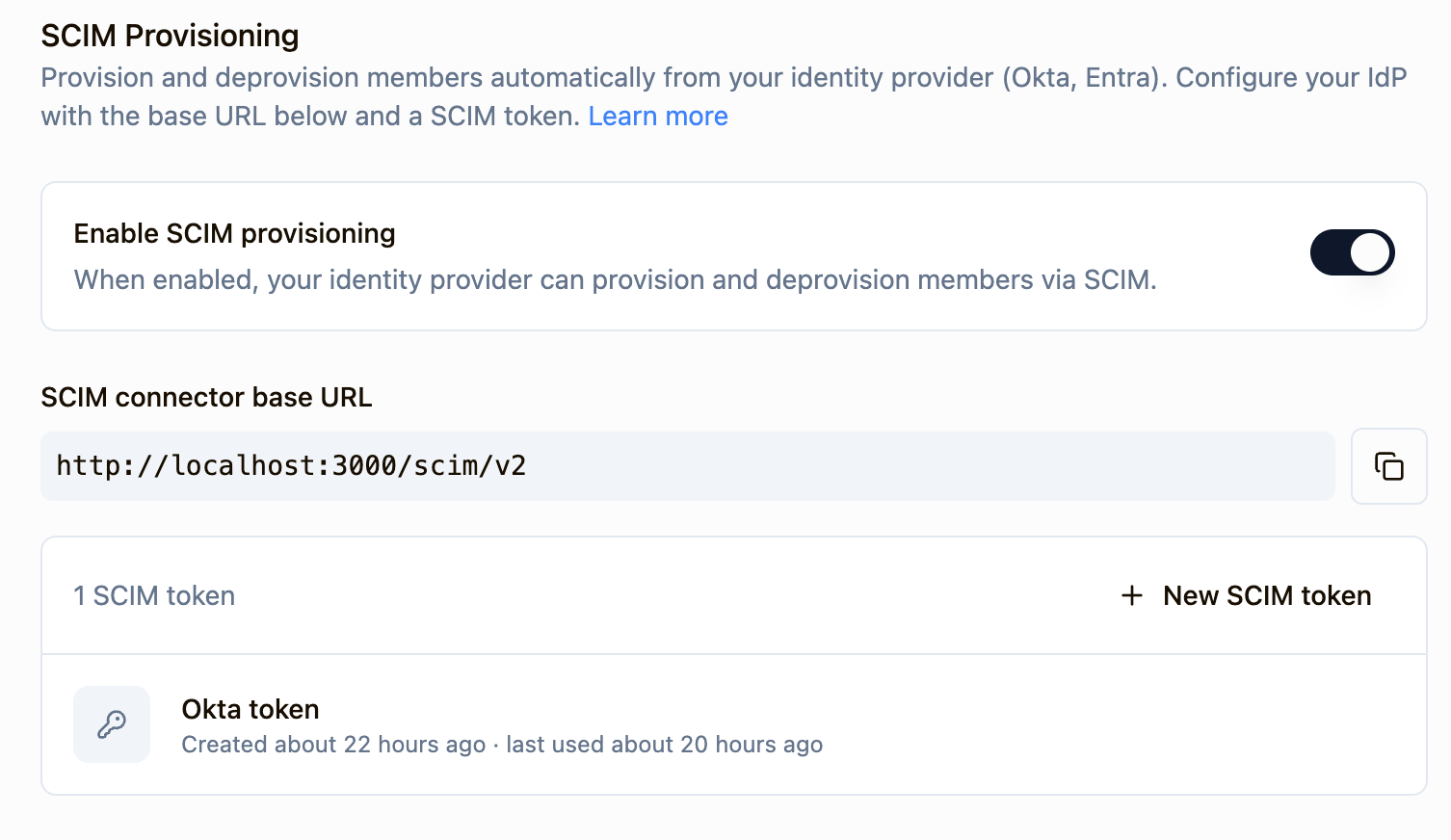
2. Under the "SCIM provisioning" section, toggle the option to enable SCIM.
3. You can now get your **SCIM connector base URL** and generate a **SCIM Bearer auth token**. These values will be needed to configure SCIM in your identity provider.
When SCIM provisioning is enabled, Admins will **not** be able to manage users from within Sourcebot as they will be kept up to date through your identity provider. Role assignments can still be managed within Sourcebot.
### IdP-specific configuration notes
Okta does not support SCIM in an OIDC app integration. To work around this, two apps need to be created:
1. An OIDC app used for SSO.
2. A SAML provisioning-only app. The SSO portion of the app should not need to be functional.
[Learn more](https://support.okta.com/help/s/article/configure-scim-for-a-custom-oidc-app).
* Follow [these instructions](/docs/configuration/idp#okta) to setup a Okta OIDC app and configure it as a SSO provider in Sourcebot.
* In Okta admin pages, create a SAML 2.0 application. This app will be used for provisioning-only and will not be used for SSO. The sign-on URL and audience URI can be set to the base URL of your deployment.
* In the General tab, click Edit and choose SCIM in the Provisioning section and Save.
* In the Provisioning tab, enter the SCIM Base connector URL from Sourcebot.
* For the Unique identifier field for users section enter **userName**
* For Supported provisioning actions, enable "Push New Users" and "Push Profile Updates"
* For Authentication mode field, choose HTTP Header and enter your SCIM token generated in Sourcebot. You can now test the configuration and save
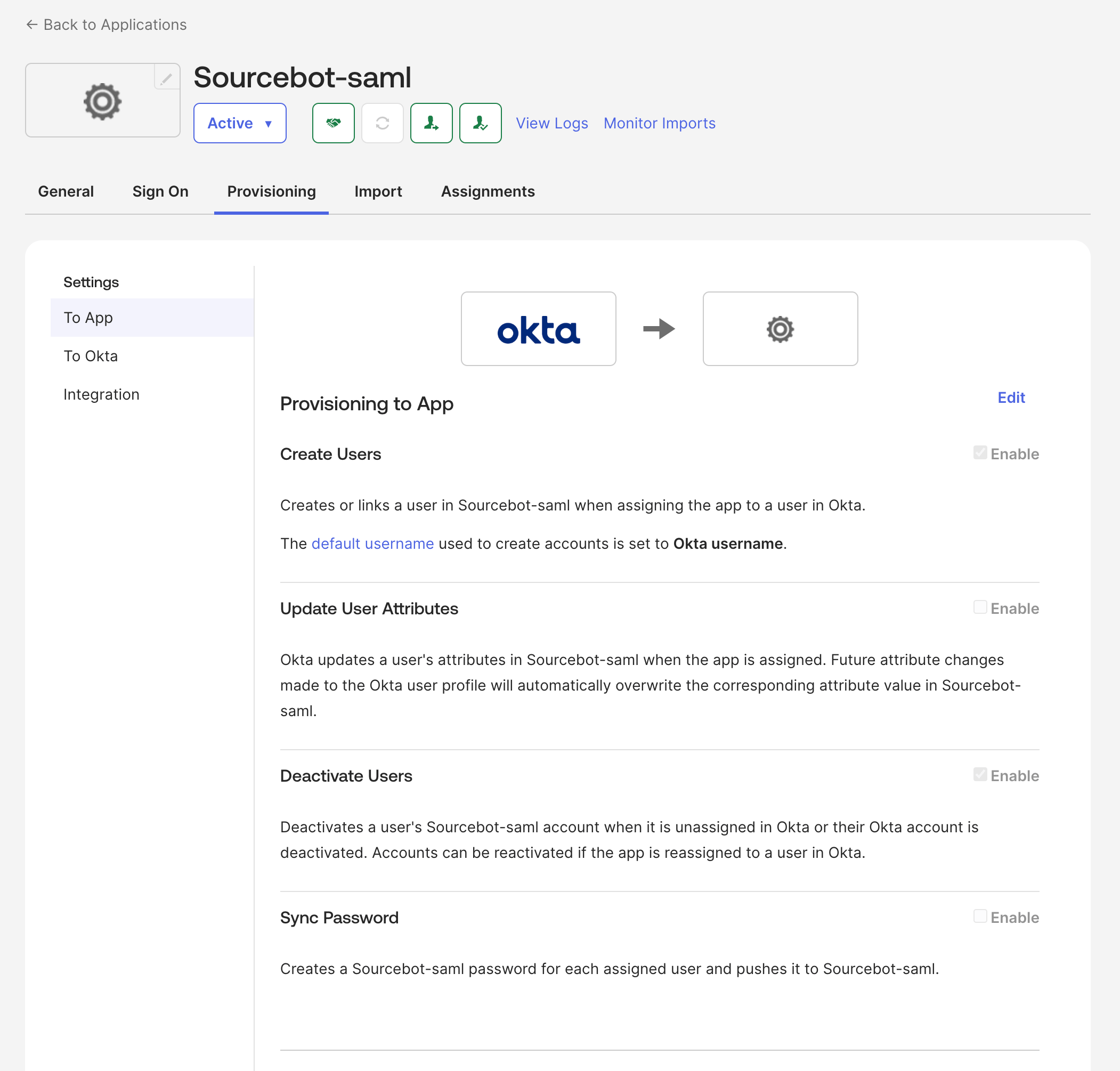
* Lastly, return to the Provisioning tab in Okta and edit your settings under “To App” to enable the SCIM functionality needed for your Sourcebot application (Create, Update and Deactivate users)
{feature_0} {verb_0 ?? "is"} only available in a paid plan. Please activate a [license key](/docs/activating-a-subscription) to use this feature.
## Overview
SCIM provisioning lets your identity provider manage Sourcebot organization membership automatically. When enabled, your identity provider becomes the source of truth for who should have access to your Sourcebot organization.
Sourcebot supports SCIM 2.0 user provisioning for identity providers such as Okta and Microsoft Entra ID.
## Configure
1. Navigate to **Settings -> Security**.
2. Under the "SCIM provisioning" section, toggle the option to enable SCIM.
3. You can now get your **SCIM connector base URL** and generate a **SCIM Bearer auth token**. These values will be needed to configure SCIM in your identity provider.
When SCIM provisioning is enabled, Admins will **not** be able to manage users from within Sourcebot as they will be kept up to date through your identity provider. Role assignments can still be managed within Sourcebot.
### IdP-specific configuration notes
Okta does not support SCIM in an OIDC app integration. To work around this, two apps need to be created:
1. An OIDC app used for SSO.
2. A SAML provisioning-only app. The SSO portion of the app should not need to be functional.
[Learn more](https://support.okta.com/help/s/article/configure-scim-for-a-custom-oidc-app).
* Follow [these instructions](/docs/configuration/idp#okta) to setup a Okta OIDC app and configure it as a SSO provider in Sourcebot.
* In Okta admin pages, create a SAML 2.0 application. This app will be used for provisioning-only and will not be used for SSO. The sign-on URL and audience URI can be set to the base URL of your deployment.
* In the General tab, click Edit and choose SCIM in the Provisioning section and Save.
* In the Provisioning tab, enter the SCIM Base connector URL from Sourcebot.
* For the Unique identifier field for users section enter **userName**
* For Supported provisioning actions, enable "Push New Users" and "Push Profile Updates"
* For Authentication mode field, choose HTTP Header and enter your SCIM token generated in Sourcebot. You can now test the configuration and save
* Lastly, return to the Provisioning tab in Okta and edit your settings under “To App” to enable the SCIM functionality needed for your Sourcebot application (Create, Update and Deactivate users)
 ## User lifecycle
Sourcebot represents organization users with three membership states:
| Sourcebot state | Access | Billing |
| --------------- | -------------------------------------------- | ---------- |
| Pending | Can access the organization after signing in | Not billed |
| Active | Can access the organization | Billed |
| Suspended | Cannot access the organization | Not billed |
When a user is provisioned through SCIM, Sourcebot creates or restores their organization membership. New SCIM-provisioned users appear as **Pending** until they sign in and access the organization for the first time.
When a pending user signs in, Sourcebot moves them to **Active** and they count toward billing. On deployments with a hard seat cap, the user can only become active if a seat is available.
When your identity provider deactivates a user by sending `active: false`, Sourcebot marks the user as **Suspended**. Suspended users cannot access the organization, and Sourcebot revokes their active sessions, API keys, and OAuth tokens.
If your identity provider reactivates the user by sending `active: true`, Sourcebot restores their membership as **Pending**. They become **Active** and billable again only after they sign in and access the organization.
## Roles
SCIM does not assign Sourcebot [roles](/docs/configuration/auth/roles-and-permissions). Users created through SCIM are added with the **Member** role.
Owners can promote active members to owner, or demote owners to member, from **Settings -> Members**. Sourcebot prevents changes that would leave the organization without an active owner.
## Supported attributes
Sourcebot stores this subset of SCIM user attributes:
| SCIM attribute | Sourcebot behavior |
| ---------------- | -------------------------------------------------- |
| `userName` | User email address |
| `emails` | User email address; the primary email is preferred |
| `name.formatted` | Display name |
| `displayName` | Display name fallback |
| `active` | Unsuspended or suspended membership state |
| `externalId` | Stored IdP external identifier |
Additional attributes may be sent by your identity provider, but Sourcebot ignores attributes it does not use.
## FAQ
SCIM provisioning should work with most identity providers that support SCIM user provisioning, but it has only been tested with Okta.
Sourcebot supports SCIM 2.0.
SCIM-created or reactivated users become billable seats after they sign in and access the organization. Until then, they appear as pending and do not count toward billing. Suspended users also do not count toward billing.
## User lifecycle
Sourcebot represents organization users with three membership states:
| Sourcebot state | Access | Billing |
| --------------- | -------------------------------------------- | ---------- |
| Pending | Can access the organization after signing in | Not billed |
| Active | Can access the organization | Billed |
| Suspended | Cannot access the organization | Not billed |
When a user is provisioned through SCIM, Sourcebot creates or restores their organization membership. New SCIM-provisioned users appear as **Pending** until they sign in and access the organization for the first time.
When a pending user signs in, Sourcebot moves them to **Active** and they count toward billing. On deployments with a hard seat cap, the user can only become active if a seat is available.
When your identity provider deactivates a user by sending `active: false`, Sourcebot marks the user as **Suspended**. Suspended users cannot access the organization, and Sourcebot revokes their active sessions, API keys, and OAuth tokens.
If your identity provider reactivates the user by sending `active: true`, Sourcebot restores their membership as **Pending**. They become **Active** and billable again only after they sign in and access the organization.
## Roles
SCIM does not assign Sourcebot [roles](/docs/configuration/auth/roles-and-permissions). Users created through SCIM are added with the **Member** role.
Owners can promote active members to owner, or demote owners to member, from **Settings -> Members**. Sourcebot prevents changes that would leave the organization without an active owner.
## Supported attributes
Sourcebot stores this subset of SCIM user attributes:
| SCIM attribute | Sourcebot behavior |
| ---------------- | -------------------------------------------------- |
| `userName` | User email address |
| `emails` | User email address; the primary email is preferred |
| `name.formatted` | Display name |
| `displayName` | Display name fallback |
| `active` | Unsuspended or suspended membership state |
| `externalId` | Stored IdP external identifier |
Additional attributes may be sent by your identity provider, but Sourcebot ignores attributes it does not use.
## FAQ
SCIM provisioning should work with most identity providers that support SCIM user provisioning, but it has only been tested with Okta.
Sourcebot supports SCIM 2.0.
SCIM-created or reactivated users become billable seats after they sign in and access the organization. Until then, they appear as pending and do not count toward billing. Suspended users also do not count toward billing.